Amtec Launches a New Job Board

Table of Contents
Finding your next role with Amtec just got easier. Our new job board is live at app.amtec.co, with every open Amtec position in one place, contract and permanent.
Every listing shows the pay up front. You can save jobs without creating an account, and when you’re ready to apply, your resume does most of the typing for you.
Search the Way You Think
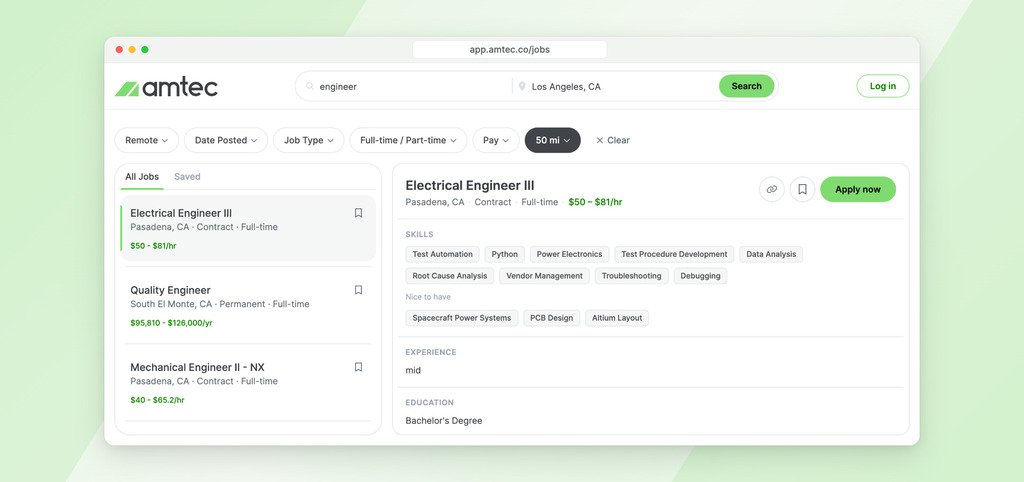
Type a job title or keyword in the first box, and a city, state or “remote” in the second. Suggestions appear as you type, and they come from jobs that are open right now, so every suggestion leads to a real opening. Words can go in any order, and jobs with your words in the title show up first.
Your search is saved in the page address, so you can bookmark it and come back later or send it to a friend who’s looking.
Filters That Narrow It Down
A row of filters sits above the results, so you can cut a long list down to the jobs that fit:
- Remote: remote jobs only, or on-site only.
- Date Posted: the past 24 hours, past week or past month.
- Job Type: permanent (direct hire) or contract.
- Full-time / Part-time: the schedule you want.
- Pay: a minimum hourly rate or annual salary.
- Distance: 5 to 100 miles from the location you enter.
Pay and Job Details Up Front
Every job in the list shows its title, location, job type, schedule and pay range. Select one and the full details open next to the list: required skills and nice-to-have skills listed separately, experience level, education, schedule, contract length for contract roles, and the complete job description.
You can see whether a job is worth your time before you apply, without digging through the description to find the pay.
Save and Share Jobs
Tap the bookmark icon on any job to save it, and find it later under the Saved tab. You don’t need an account to save jobs. They stay on your device, and they move into your account when you sign in.
The link icon copies a job’s link so you can pass it along. On your phone, it opens your phone’s share menu instead.
A Faster Way to Apply
When you find the right job, select Apply now and sign in or create an account. You can use your phone number (we text you a code), your email, or your Google or Microsoft account. No new password to remember.
From there, the application takes a few short steps:
- Upload your resume. We read it and fill in your details for you.
- Check your details. Fix anything that needs fixing.
- Answer any questions the job asks, if it has them.
- Review and submit.
If you step away partway through, your application is saved so you can pick up where you left off. And the next time you apply, your details are already there, so it’s mostly a quick review.
Track Your Applications
Once you’ve applied, My Applications shows where each one stands, from Under Review to Sent to Hiring Company, Interviewing and Offer Extended. Your profile keeps your resume and details in one place, ready for the next opportunity.
Browse open jobs and find your next opportunity with Amtec!

The Amtec Team
Amtec's editorial team shares hiring strategies, career advice, and workforce insights drawn from 65+ years of staffing experience across aerospace, manufacturing, engineering, and construction.

Related Posts
View all posts-
News
Amtec’s HR Bitz: Essential Insights for HR Professionals
Amtec’s HR Bitz is a monthly newsletter designed to give HR leaders the latest insights, expert tips, and access to top talent.
-
News
Stay Ahead in Manufacturing with Amtec’s Manufacturing Bitz
Amtec is launching Manufacturing Bitz, a monthly newsletter designed specifically for manufacturing leaders and hiring managers.
-
News
Amtec Introduces Construction Bitz: Your Go-To Source for Construction News and Talent
Construction Bitz is a monthly newsletter by Amtec dedicated to keeping you connected to the pulse of the construction industry.